Wednesday, April 18, 2012

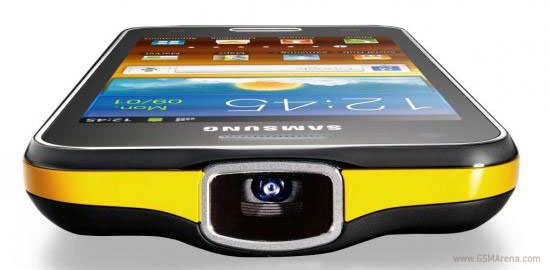
Samsung Galaxy Beam is now available for pre-order in Europe

One of the most interesting smartphones to come in recent times is now available for pre-order in Europe.


The Samsung Galaxy Beam units can be booked for £430 (€525) a piece without a contract. Currently, there's no details on when the device is going to be available, but if you want to secure your Beam, hit the source link for the pre-order page.
Using the Galaxy R as a base, the Beam is built around a 4.0-inch WVGA LCD screen and rocks a 1GHz Cortex-A9 dual-core processor and 768MB of RAM. The party piece, however, is the built-in projector which can display images as big as a 50" TV at a 2-meter distance.

RIM launches cheap BlackBerry Curve 9220 in India

Good news for the RIM users in India. RIM announced the BlackBerry Curve 9220 – a cheap smartphone running on the latest 7.1 OS version.
It has a four-row QWERTY keyboard and a 2.44-inch QVGA display. Other notable features are the 2MP camera, Wi-Fi connectivity, Bluetooth, FM radio, the microSD card slot and 512MB of RAM. The headset does not support 3G networks, just GSM/EDGE ones.


The users who purchase the BlackBerry Curve 9220 will be able to download a selection of apps worth INR2500 (€37) for free until June 30.
The Curve 9220 will become available on April 19 in India, while the global release should follow a few weeks later. The pricing is yet to be confirmed though.

Intel Atom based smartphones to go on sale starting tomorrow

Intel CEO Paul Otellini announced during a financial earnings call that the company's first Atom based smartphone will go on sale "later this week".
This is not really a surprise because the Indian company Lava, with whom Intel partnered to make Atom based Android phones, has already announced their intentions to launch the Xolo X900 tomorrow, April 19, in India.


Just in case you are not aware of this phone, it has a 4.03-inch display with 1024 x 600 resolution (295 PPI), 8 megapixel rear camera with flash, 10fps burst mode and 1080p video recording, 1.3 megapixel front camera, 1GB RAM, 16GB internal storage space, HSPA+ connectivity up to 21Mbps, HDMI out and NFC built-in. Unfortunately, the phone will be sold with Android 2.3 Gingerbread at launch.
The Xolo X900 will use Intel's Atom Z2460 processor that has a single-core 1.6GHz Saltwell CPU with Hyper-Threading, PowerVR SGX540 GPU clocked at 400MHz and 32-bit Dual channel LPDDR2 memory. This processor, however, is based on Intel's x86 architecture that differs from the one that ARM uses on almost every other SoC on the market, which means application compatibility is going to be an issue initially.
No price has been mentioned so far for this device although we expect it to be around $500 unlocked, considering Lava's reputation for not being a premium brand.
Unfortunately, the rest of the world will have to wait for now, because even the Lenovo K800 is slated to launch only in China.
Wednesday, April 4, 2012

100 Reasons to Jailbreak [Video]

Here's a nice video posted by cadsii showing 100 reasons why you should jailbreak your iOS device.

Check it out below...

Thursday, March 22, 2012

Jailbreak iPhone 4S 5.1 using Absinthe

Jailbreak Iphone 4S 5.1 using Absinthe released. Now you can jailbreak your iPhone 4S  5.1(the latest version of iphone 4S)  For jailbreak instructions click HERE


Tuesday, May 24, 2011

See this post clearly http://www.iclarified.com/entry/index.php?enid=635

These are instructions on how to unlock your 3.9 Bootloader iPhone with AnySIM 1.3 for use on the 1.1.3 firmware!

To follow these directions you must have a 3.9 Bootloader iPhone. This means that your iPhone came with firmware 1.1.1 or lower out of the box. The instructions also assume that you already have soft updated to 1.1.3.

Step One
First we must update our baseband to 04.03.13_G. To do this you must follow this tutorial:
http://www.iclarified.com/entry/index.php?enid=640

Step Two
Now that we are at 1.1.3, jailbroken, and with the right baseband we can begin to unlock!

Press to select Settings from the Springboard.


Step Three
Press to select General from the list of Settings.


Step Four
Press to select Auto-Lock from the General Menu.


Step Five
Press to select Never from the Auto-Lock Menu.


Step Six
Press the Home button to return to your Springboard then press the Installer icon to launch it.


Step Seven
Press the Install tab at the bottom of the screen.


Step Eight
Press to select iClarified from the list of Categories.


If you haven't already added the iClarified installer source you must do this to see the iClarified category! You can find instructions to do this here:
http://www.iclarified.com/entry/index.php?enid=636

Step Nine
Press to select anySIM 1.3 from the list of Packages.


Step Ten
Press the Install button at the top right of the screen.


Step Eleven
Press the large red Install button that appears.


Step Twelve
The anySIM 1.3 will install and then you will be returned to the Categories list. Press the Home button to return to your Springboard.


Step Thirteen
Notice the new anySIM icon on your Springboard. Before we can unlock we must enable Airplane mode. Press to select Settings from your Springboard.


Step Fourteen
Slide the Airplane Mode switch to the ON position.


Step Fifteen
Press the Home button to return back to your Springboard. Press the anySIM icon located on your Springboard.


Step Sixteen
Press the large OK button to continue past the welcome message.


Step Seventeen
Slide the Unlock Slider to the right to begin your unlock procedure.


Step Eighteen
Scroll down and read the legal information then click the large red OK, Unlock My Phone button.


NOTES***: If you are experiencing a problem with AnySIM telling you that your Auto-Lock is not set to never you can try this solution posted by iderzh. Thanks!

It is very simple solution, the root cause is: anySIM 1.3 checks in /var/root/Library/Preferences/com.apple.springboard.plist file "SBAutoLockTime" value. So, if you used Official Dev Team 1.1.3 Upgrade this file was moved to /var/mobile/Library/Preferences/ .

Solution only for iPhone with 1.1.3 (Official Dev Team Release):
1. Set "Auto-Lock" to "Never"
2. Rename /var/root/Library/Preferences/com.apple.springboard.plist to /var/root/Library/Preferences/com.apple.springboard.plist.old
3. Copy /var/mobile/Library/Preferences/com.apple.springboard.plist to /var/root/Library/Preferences/com.apple.springboard.plist
4. Set "Airplane mode" to ON.
5. run anySIM 1.3 (now it should run smoothly)
6. rename /var/root/Library/Preferences/com.apple.springboard.plist.old to /var/root/Library/Preferences/com.apple.springboard.plist
7. turn "Airplane mode" OFF